

3 minute read
If you’re an Apple Home Kit person but you’ve got Ring cameras, you already know they don’t play nice together natively. This little weekend project fixed that for me, and it’s been one of the better things I’ve set up in a while.
What’s in the box
The setup is a Raspberry Pi 4 sitting inside an Argon ONE aluminum case. The case alone is worth it. It makes the Pi look like an actual product instead of a bare circuit board, routes all the ports cleanly out the back, and helps keep temps down passively.
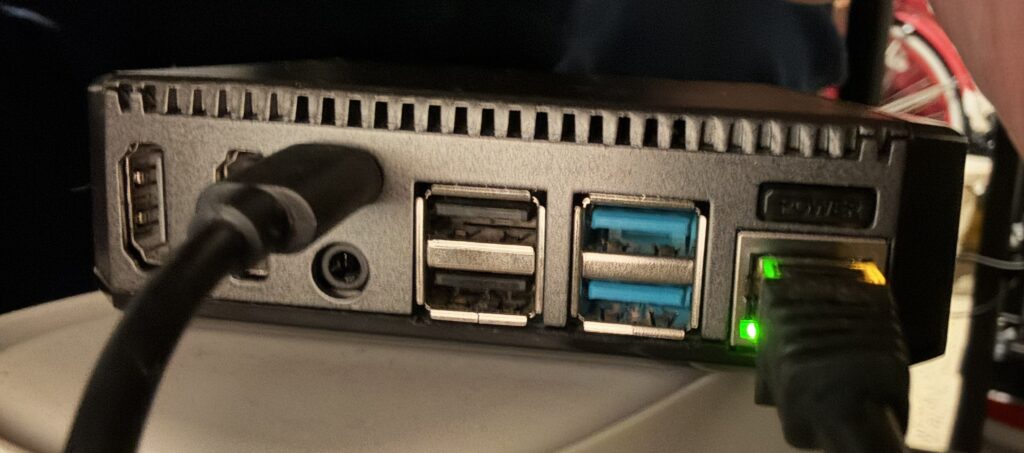
The Pi runs off a microSD card loaded with the Homebridge OS image, which is a slim Debian-based Linux install built specifically for running Homebridge. Nothing extra, nothing bloated.
What’s under the hood software-wise
Homebridge is a free, open-source app that acts as a translator between non-HomeKit smart home devices and Apple’s Home app. You can download it and find install guides for Raspberry Pi and other platforms at homebridge.io. You install plugins for whatever gear you have, and Homebridge makes it all show up in HomeKit like it was designed for it.
The plugin I needed in Homebridge was the Ring plugin, which pulls in all my Ring cameras (Kitchen, Dining Room, Living Room, Patio) plus the doorbell and exposes them to HomeKit. Motion alerts flow in real time. When something triggers a camera, Homebridge grabs a snapshot and sends the event over to HomeKit. It shows up in the Home app just like any native HomeKit camera would.
Does it run well?
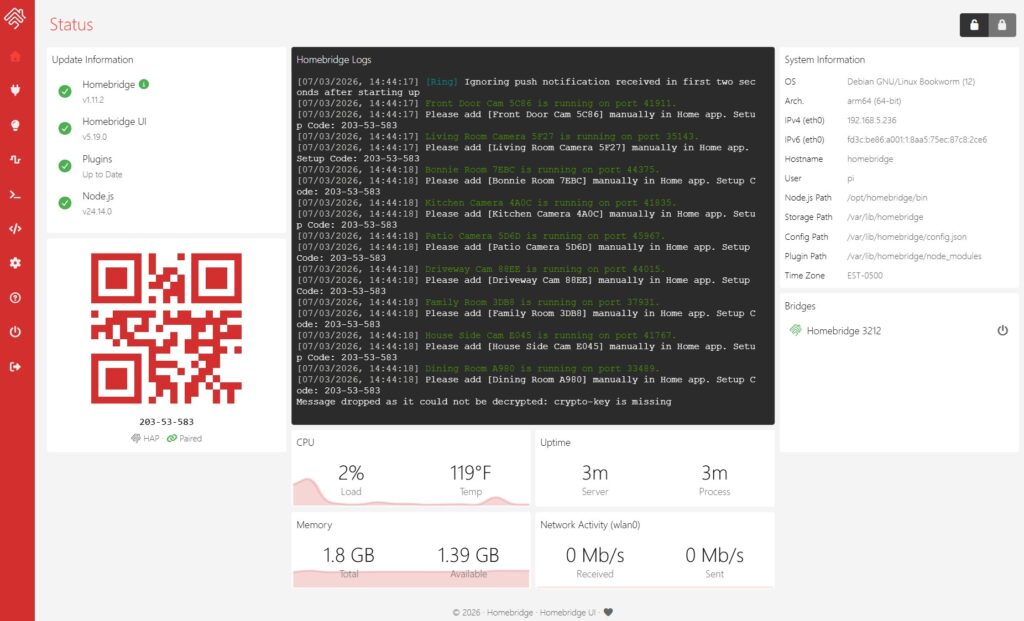
CPU load is at 2% and temps are sitting around 119F, which is normal for a Pi. Memory usage is light with 1.39 GB still free out of 1.8 GB total. Homebridge itself is currently at v1.11.2 and everything is fully up to date, including the Homebridge UI (v5.19.0) and Node.js (v24.14.0).
The logs basically just show a constant stream of motion events from the cameras, which tells me it’s doing its job. Homebridge also handles its own maintenance in the background, like cleaning up old config backups and running scheduled snapshots automatically. Notice the QR code and number on the dashboard?? That’s how you add devices to Apple Home. Just add a new accessory, scan that QR Code and bingo you can add devices that way. BTW, once you do this if you have an Apple TV the cameras will show up there too! Very cool.
What’s the final verdict on it?
Totally. The Pi 4, microSD card, and Argon case will run you somewhere in the $120-130 range depending on which RAM version you pick up, and the software is free. Once it was paired with HomeKit, I haven’t had to touch it. All four cameras and the doorbell show up in the Home app and work the way you’d expect a native HomeKit device to work.
If you’re sitting on Ring hardware but living in an Apple household, Homebridge on a Pi is the move. It just runs.
One thing worth mentioning: if you already have a NAS like a Synology or QNAP, you may be able to run Homebridge directly on that instead using Docker or a package add-on, which would save you the Pi cost entirely. Worth checking if your NAS supports it before buying new hardware.
Homebridge v1.11.2 running on Debian Bookworm, arm64